
Before you start
- Use the expiry and after-opening information on the original package or leaflet, not a general number of days borrowed from another medicine.
- Check the phone’s date and time zone, and the permissions for notifications or calendars.
- This guide covers expiry and appointment reminders, not a daily medication dosing schedule.
Keep printed expiry and after-opening limits separate
The printed expiry and the limit after opening are different dates. Preserve the printed expiry as shown on the package, and record the actual opening date and any after-opening period specified for that medicine.
MedCabin does not infer a safe after-opening period for every medicine. Ask a pharmacist if the instructions are unclear instead of copying a period from another product. An after-opening prompt is also distinct from the status of a package that has passed its printed expiry.
Check the dates, then choose how to be reminded
Save the correct dates in the medicine record first, then decide whether to enable notifications or write events to a calendar.
Record the printed expiry
When adding or editing a medicine, compare the date with the package, correct any photo recognition mistake and save it.
Add opening information
If the medicine is open, use the edit area of its detail screen to record the opening date and after-opening period. Do not overwrite the printed expiry just to add another reminder.
Review the reminder screen
Check the medicine, date and reminder type. Appointment or follow-up reminders come from the relevant visit record, not the package date.
Authorize notifications or a calendar
Enable local notifications in reminder settings if wanted. To write events to a calendar, separately grant calendar access, choose the destination calendar and sync.
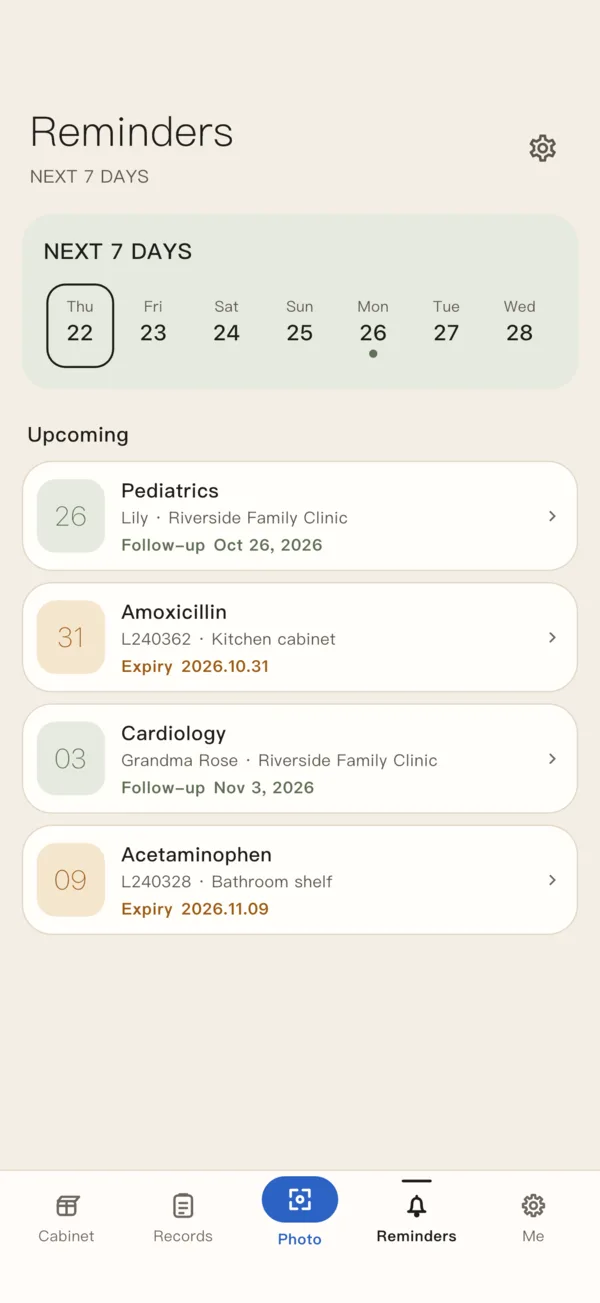
When does the current version schedule notifications?
For printed expiry, the current version schedules future local notifications 30 days before expiry and at 9:00 a.m. local time on the expiry date. An after-opening notification is scheduled for 9:00 a.m. on its limit date when the medicine is marked open, a period has been entered and that date is earlier than printed expiry. Past notification times are not replayed.
This describes the current scheduling behavior, not a delivery guarantee. Notification permissions, focus settings and Android battery restrictions can affect display or delivery. Keep another way to check important dates.
A reminder cannot decide whether a medicine is appropriate to continue using. It does not replace a doctor’s or pharmacist’s advice.
What happens to information written to a calendar?
An event written to the system calendar may sync to the service behind the calendar account you choose. It is no longer only a local app record, so check the account and who can see that calendar before authorizing the feature.
With permission retained, edits and deletions of linked records can update their calendar events. Once calendar access is revoked, the app cannot continue updating those events; remove existing events in the calendar yourself.
- An item appears but no notification arrives? Check permission, phone time and battery settings first.
- Want records to stay inside the app? Do not enable calendar sync.
- Need reminders for daily doses? These expiry reminders do not provide a daily dosing schedule.